Hey folks!
Here's the start for logos... please make sure you get a thumbnail sheet to complete step two... flip the paper over to write in the explanations!
Good Luck! Maximum Effort!
Monday, February 27, 2017

Thursday, February 2, 2017
Tuesday, January 17, 2017
Sunday, January 8, 2017
Welcome Back!
Hi Guys,
Hope you had a great break, and feel up for second semester. I will be back next week. For this week, you will be working on the following two monsters:
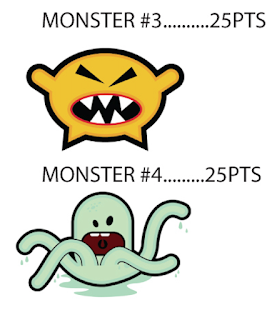
The instructions for the monsters are in the post below (what you were reading off before we went on break). After you've finished with the two monsters, complete the last assignment for the monsters:
Hope you had a great break, and feel up for second semester. I will be back next week. For this week, you will be working on the following two monsters:

The instructions for the monsters are in the post below (what you were reading off before we went on break). After you've finished with the two monsters, complete the last assignment for the monsters:
- Create your own monster
- Must be at least 3 colors
- Must create the inside line surrounding the monster
- The monster must be YOUR idea, not from other sources
- Must put the monster on a spooky background--you have to make this.
- It is worth 50 points!
These will be graded when I return next Monday. Remember: the yellow monster (25pts), the green monster (25pts), and your monster (50pts). We will start the South Park assignment next.
Good luck,
-Bourland
Tuesday, December 13, 2016
Intro to Illustrator!
Hellur!
It's Illustrator day... what does that mean??? It's the start to graphic design... You'll be designing monsters today... Follow the instructions in the PDF below!
Underneath the PDF, you will see the final versions of what your monsters should look like. After you have completed the four monsters, you will make your own!

Sunday, December 4, 2016
YOUR NEWSPAPER!
Okay Children of the Corn! It's your chance to show what you've learned... Check out the powerpoint for the instructions on how to put together your newspaper!
Monday, November 14, 2016
Recreating a Front Page!
You've created a skeleton, and a front page template for the Cactus Chronicle. Now, you're going to attempt to recreate a newspaper of your choice.
As a helpful hint, here's the pixel settings for the following newspapers:
MAKE SURE YOU CHANGE YOUR SIZES IN THE INDESIGN WINDOW!!!
Broadsheet: 90p0 x 50p0
Berliner: 70p0 x 40p0
Tabloid: 40p0 x 30p0
This is the site you're visiting! But it's in the PowerPoint too!
DO IT.
As a helpful hint, here's the pixel settings for the following newspapers:
MAKE SURE YOU CHANGE YOUR SIZES IN THE INDESIGN WINDOW!!!
Broadsheet: 90p0 x 50p0
Berliner: 70p0 x 40p0
Tabloid: 40p0 x 30p0
This is the site you're visiting! But it's in the PowerPoint too!
DO IT.
Subscribe to:
Posts (Atom)